


Impact Theory
Project Kyzen
From PFP to Mini-Battle Arenas
A collectible avatar drop that grew into a free-to-play party brawler, and the interface that had to grow with it.
Premise vs reality
A profile-picture experience. Kyzen started as a glorified PFP during the NFT craze.

Our players wanted far more than a picture, so we built a video game, and I designed every screen they played it through.
The product outgrew its premise. An avatar flow built to end at a mint had to become the front door to a game, and a UI built around one collectible had to carry a whole match. The brief changed underneath the work, somewhere between the Phase 1 avatars in April 2023 and the arena launch in August 2024.
Where I sat
I spent nearly three years on Project Kyzen, from the first wireframes through final design. In the PFP era my lane was avatar systems, minting, store and brand. Once we became a game, it was every piece of UI a player touched in and around a match: the HUD and all of the menus. It was very much a team build, with leads for art, story, game design, 3D and marketing. The outcomes below are things we shipped; my part was the UX/UI.
TL;DR
- I owned all of the in-game UI for Mini-Battle Arenas: the HUD and every menu, including the Progress Pass, the store and the emote wheel.
- I designed the avatar experience behind 50,000+ avatars minted and personalized.
- Mini-Battle Arenas launched on August 22, 2024 with five game modes (a team launch; my part was the UI).
- Our dev team reported 35% shorter development timelines (team result; my part was the UX/UI system and documentation).
- I designed the K.R8Z crate screen and its four tiers, and built the in-game credits screen.
Process
Wallet → avatar → Photobooth → mint
Kyzen began as avatars-as-profile-pictures at the height of the NFT craze. In Phase 1 (April 2023), players connected a wallet and built a fully custom 3D avatar step by step, posed it in a Photobooth, then named it and minted it for free on Immutable, with no gas fees. 50,000+ Kyzen avatars were minted and personalized.
- 01Connect walletDo you have an avatar? One fork, right at the door.
- 02Build the avatarBody type, face, head, body, legs-and-feet, back items.
- 03PhotoboothPick a pose and a background, preview. Satisfied? No loops back.
- 04Name + mintFree on Immutable, no gas. 50,000+ minted.
- 05Into the ArenaThe line-up becomes a roster for the game.


The flow, in words
My Phase 1 process flows start with one fork right after a player connects a wallet: do you have an avatar? If not, you go into avatar creation; if you do, you go to the lobby. Creation runs from base body type through the face (skin, hair, then hats, glasses and earrings) and the body, legs-and-feet and back items into the Photobooth, where you pick a pose and a background and preview the result. Then comes a check: “Satisfied with avatar?” No sends you back to earlier sections of the creation flow; yes leads to naming, minting, and seeing the finished avatar in your line-up, ready to enter the Arena or K.OS.
The PFP era had its own hard UX. Our peer-to-peer marketplace covered listing, unminting avatars, removing listings, updating sale orders and buying. A purchase paid in IMX or ETH either completes and moves the item to the buyer’s inventory or fails with an error and a suggestion to retry. Every step was irreversible or high-stakes, so the design had to communicate the stakes without inducing anxiety. I also designed a Map Designer tool for our level designers and the brand system (logo, palette, and the Druk and The Future typefaces).
Then it became a game
Our community had a bigger appetite than a picture could feed, and Tom Bilyeu had a real passion for games like Fortnite and Minecraft. So the team built a fast third-person party brawler, Mini-Battle Arenas. The high-fidelity flow covers the whole loop:
- Mode select
- Lobby search and team gathering
- Loading screen
- The arena HUD
- Round won or round lost
- Victory with XP added
- Final stats and match results, then back to the lobby
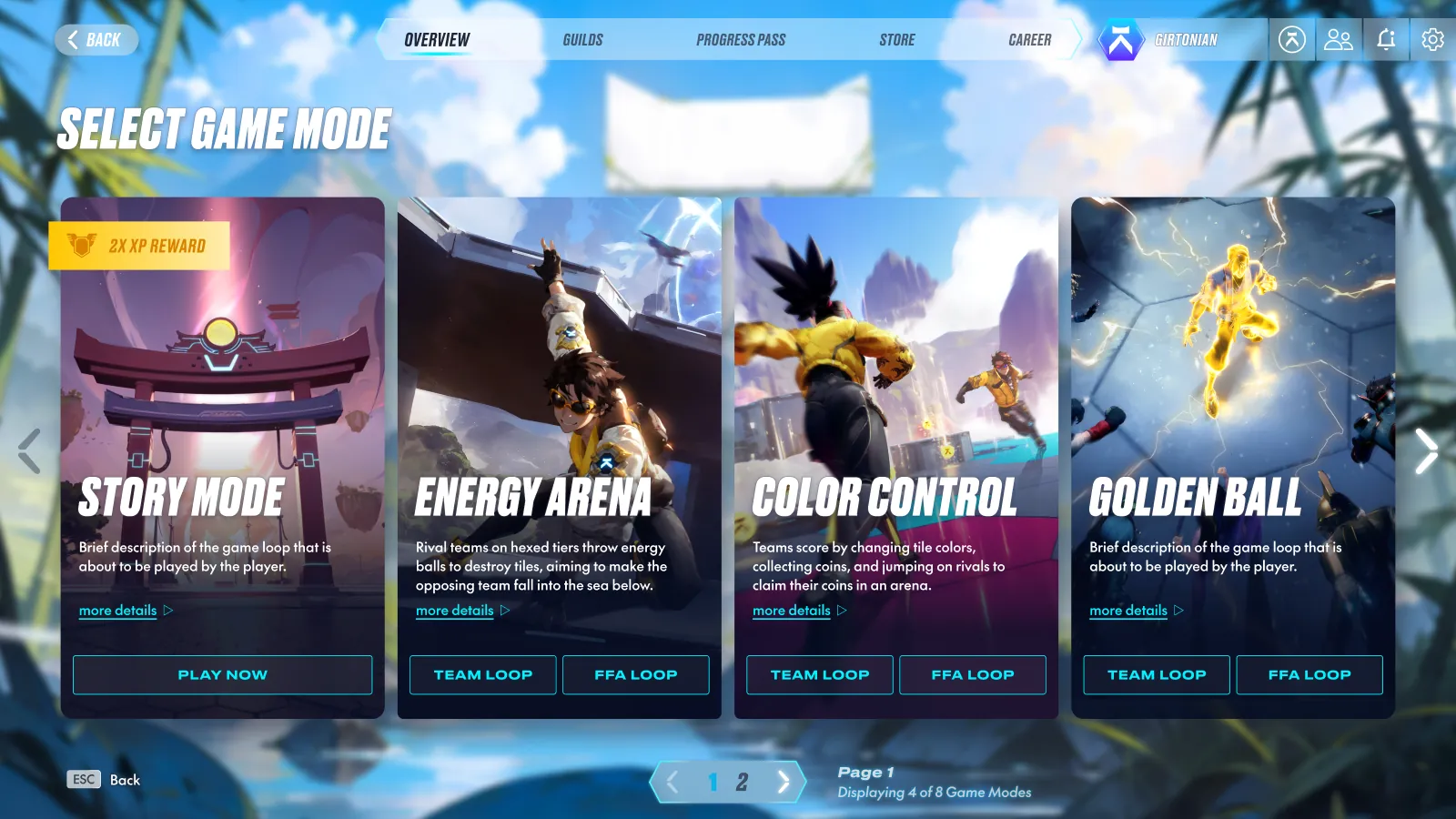
The mode screen is a row of tall cards, one per mode. Modes with team and free-for-all versions get Team Loop and FFA Loop buttons, so choosing a mode and a format is a single click. I laid it out for two, three and four modes per page so it could keep up as modes were added, and Esc always goes back. A pause menu sits over a blurred match, so you never lose your place.
Achievements, wireframe to final


One system, many states
The arena floor is made of hexagonal tiles, so the hexagon carries through the whole HUD: coin and tile counters, ability slots, accolade badges. Kill streaks and accolades each got their own badge.
Kill x2 
Kill x3 
Kill x4 
Kill x5 
Headshot 
Killjoy 
Flawless
K.R8Z: four tiers, one screen
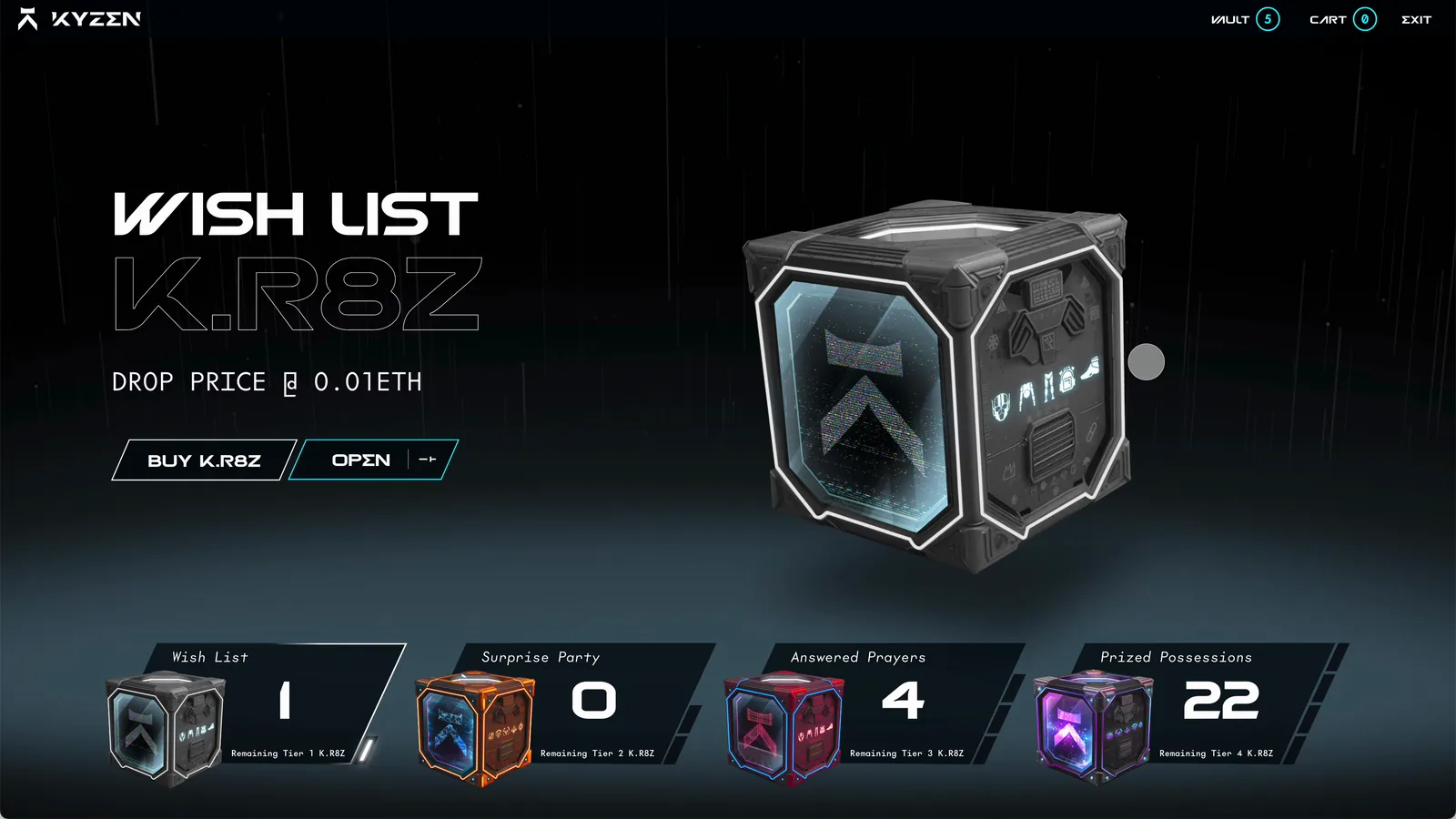
K.R8Z were Kyzen’s crates, and this screen mockup is mine. There are four tiers, each with its own drop price and color: Wish List (Tier 1, 0.01 ETH, dark steel with cyan), Surprise Party (Tier 2, 0.03 ETH, orange), Answered Prayers (Tier 3, 0.05 ETH, red) and Prized Possessions (Tier 4, 0.1 ETH, violet). Picking a card crossfades the floor, the crate and the copy to that tier. Buy K.R8Z is always there, but Open only shows up when you hold a crate of that tier.
Tier 1 · Wish List · 0.01 ETH 
Tier 2 · Surprise Party · 0.03 ETH 
Tier 4 · Prized Possessions · 0.1 ETH

Team results I contributed to
- 35%shorter dev timelinesTeam-reported, via our project manager
- 50,000+avatars mintedPhase 1, free on Immutable
- Aug 22, 2024Mini-Battle Arenas launchedFree to play, five game modes
Mini-Battle Arenas launched on August 22, 2024, free to play under the Project Kyzen name, with five gameplay modes and Bruce Lee playable from launch weekend. In the first month we added a 100-level Bruce Lee Progress Pass, custom lobbies, community-made maps and a weekly store refresh. My part was the in-game UI and the UX/UI system and documentation behind it.
“Game design teaches you that every screen is a contract. Break it once and you lose the player forever.”
Gallery
The in-game UI
The defining move: every part of the HUD answers one question, and the middle of the screen stays clear for the fight.
- Am I winning? Top center: both teams’ scores and portraits flank the round timer.
- Am I alive? Bottom left: portrait and health bar, coin and tile counts above.
- What can I do? Bottom right: ability hexes with key hints and cooldowns, ammo, buffs.
- What just happened? Near the crosshair: short callouts that appear and leave, plus a kill feed.
What I cut
In a party brawler, every pixel of HUD competes with the fight. I kept on screen only what you can read in peripheral vision and let everything else (eliminations, achievements, kill streaks) arrive as brief callouts instead of permanent panels. The HUD skeleton stays the same from mode to mode; only the piece that has to change does.
The team HUD: score and clock up top, your health bottom left, your abilities bottom right, and the middle left clear for the fight. The free-for-all HUD layer on its own, with the game removed: everything hugs the edges. The eight-slot emote wheel, open over a dimmed match. The Progress Pass: level and XP, a big preview of the selected reward, and the reward track underneath. The premium upgrade: “Unleash the Dragon Within.” Rewards are purely cosmetic. My K.R8Z screen mockup, moving through all four tiers (0:28, no sound). Victory: the squad score, Play Again, and a countdown back to the lobby. The in-game credits screen I designed and built for the team.
In motion
The Phase 1 reveal: title card, the mech flyover and the avatar lineup. A lightning ability going off in the arena.
The team (from the in-game credits screen)
- Jonathan Girton, Lead UX/UI Designer
- Andrew Silver, Edmundo Sanchez and David Kim, Art Directors
- Joss Monzon, Creative Director
- Nathan Kayser, Marketing Creative Director
- Andru Perez, Graphic Designer
- David Kosak and George Pags, Game Designers
- Ethan Hamilton, Story Editor
- Casey Wolfe, Story Writer
- Will Vu, Project Manager
- Rune Co and MATTE CG, 3D Modeling/Environment
Ask about this project
Questions about Project Kyzen? Email connect@girtonian.com.